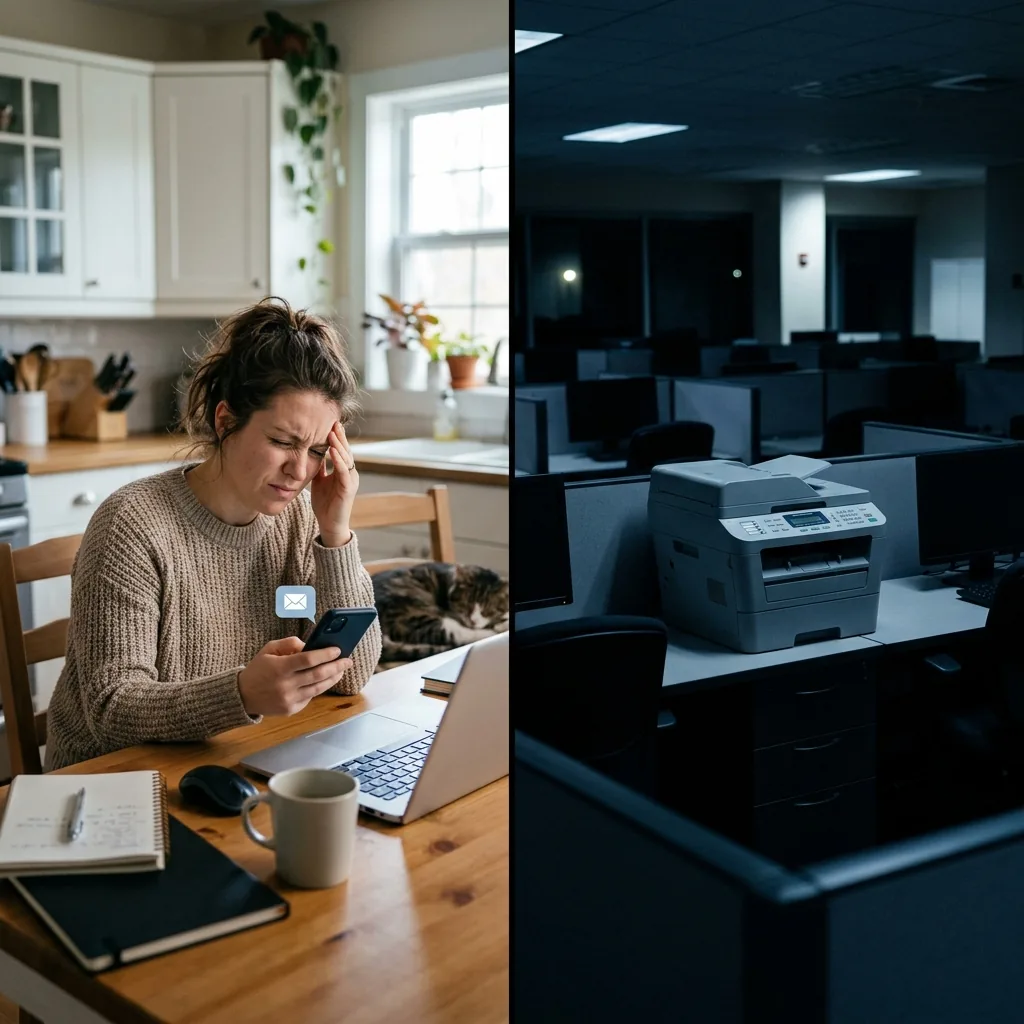
It’s 2026, and I still see this message in Slack channels at least once a week.
Let me paint the picture. A team of professionals — let’s say a five-person real estate agency — went hybrid in 2021. They invested in cloud storage, video conferencing, electronic signatures, project management tools, and secure messaging. They rebuilt their entire workflow for location-independent work.
But they kept the fax machine.
And now, three years into their hybrid arrangement, someone still has to drive to the office every time a title company needs a faxed document. Every time a lender requires a faxed authorization. Every time a client’s bank insists on receiving a faxed verification.
They automated everything — except the one piece of infrastructure that still requires someone to physically stand in front of a machine and feed paper into it.
The hybrid work paradox
The shift to remote and hybrid work forced businesses to digitize rapidly. Between 2020 and 2023, companies adopted cloud tools at unprecedented speed. File sharing moved to the cloud. Meetings moved to video. Contracts moved to e-signatures. Phone systems moved to VoIP.
But fax? Fax got left behind.
Most businesses simply never addressed it. The fax machine sat in the corner of the empty office, continuing to print incoming documents that nobody picked up for days. Outgoing faxes required someone to make the trip in — a 30-minute drive for something that should have taken 30 seconds.
I’ve spoken with businesses where this pattern lasted for years before anyone flagged it as a problem worth solving.
Why fax didn’t get the remote treatment
There’s a simple reason fax was excluded from the remote work modernization wave: most people assumed fax was going away entirely.
“We barely use it anymore — it’s not worth investing in a solution.”
Except they did still use it. Just infrequently enough that nobody prioritized it, but frequently enough that it remained a recurring pain point.
A real estate agent needs to fax maybe 3–5 times per week during active transactions. An accountant might fax 10–15 times during tax season. A medical office manager receives 20+ incoming faxes daily from referring physicians and insurance companies.
It’s not constant — but it’s consistent. And every single instance requires either a trip to the office or asking a colleague who happens to be there to handle it.
That Slack message — “Can someone go to the office to fax this?” — is the symptom of a gap that should have been closed years ago.
How to send a fax from your phone (or any device)
Cloud fax — also called online fax or virtual fax — is the technology that closes this gap. And ironically, it’s been available since well before the remote work revolution began. Most businesses simply never thought to adopt it because the fax machine “worked fine” when everyone was in the office.
Here’s how cloud fax fits into a remote workflow:
Sending a fax from home (or anywhere): Open the app on your phone or laptop. Upload the document — PDF, Word, image, whatever format you have. Enter the recipient’s fax number. Tap send. The cloud service converts your document into a fax signal and transmits it over the phone network. The recipient’s machine prints it normally. They have no idea you sent it from your couch.
Receiving a fax at home (or anywhere): Someone faxes your business number. The cloud service receives the signal, converts it to an encrypted PDF, and delivers it to your inbox — email or in-app. You view it on your phone, laptop, or tablet. No printing. No physical machine. No need to be anywhere near the office.
From the outside, nothing changes. Clients, banks, courts, and government agencies send and receive faxes using the same number. The only difference is that on your end, there’s no machine — just an app.
Four types of professionals this solves for immediately
1. Mobile notary signing agents. Your entire job is location-independent. You meet clients at their homes, offices, hospitals, and coffee shops. Title companies expect faxed confirmation of completed signings — often within minutes. Without cloud fax, you’re driving back to your office after every appointment. With cloud fax, you scan the signed documents with your phone’s camera and fax them from the signing table. Total time: 2 minutes instead of 45.
2. Real estate agents. You’re at a showing when a lender requests an urgently faxed authorization. With a physical machine, you’d need to leave the showing, drive to the office, fax the document, and drive back. With cloud fax on your phone, you send it between appointments without missing a beat.
3. Remote office managers. Your team is distributed, but the fax machine sits in a mostly empty office. Incoming faxes pile up. Someone checks them every two or three days. Meanwhile, time-sensitive documents — insurance verifications, vendor invoices, client requests — are aging in a plastic tray. Cloud fax routes everything to your inbox in real time, wherever you are.
4. Solo professionals — therapists, consultants, freelance accountants. You may not even have a permanent office. Your “office” is your home, a co-working space, or a client’s conference room. A physical fax machine doesn’t fit your model. Cloud fax gives you a professional fax number and full send/receive capability through your phone — no machine, no dedicated space, no phone line.
What about security?
This is where cloud fax actually outperforms physical machines, especially in a remote context.
A physical fax machine in a hybrid office creates a particular security problem: incoming documents print and sit in the tray for days when nobody is in the office. Sensitive documents — client financials, patient records, legal correspondence — accumulate in an unstaffed building with minimal oversight.
Cloud fax eliminates this entirely. Documents arrive as encrypted PDFs in the intended recipient’s inbox — wherever they are. No printing. No physical exposure. No accumulation of sensitive documents in an empty office.
For businesses subject to compliance requirements — HIPAA, SOC 2, ABA ethics rules, GDPR — cloud fax in a remote environment is actually more secure than physical fax in an attended office, because every document is encrypted, access-controlled, and audit-logged from the moment it arrives.
The migration is trivially simple
I want to emphasize this because it’s the most common objection I hear: “It sounds like a big project.”
It’s not. Here’s the actual process.
Step 1: Sign up for a cloud fax service. Select a plan based on your monthly volume. This takes 5 minutes.
Step 2: Port your existing fax number. You submit a porting request, and within 1–3 business days, your number transfers to the cloud service. During the port, there’s no downtime. Faxes continue arriving normally.
Step 3: Start using it. Send and receive faxes from your phone, tablet, or computer. Forward the email notification to whoever needs to see an incoming fax. Archive everything automatically in the cloud.
Step 4: Cancel your dedicated phone line and unplug the physical machine. Reclaim the counter space. You’re done.
Total effort: less than a half-day of setup, and most of that is waiting for the number port to complete.
The real cost of keeping the machine
The direct cost of a dedicated fax line — $30–60/month — is easy to calculate. But in a hybrid or remote work environment, the indirect costs multiply:
Drive-to-office trips: If someone drives 20 minutes each way to fax a document, that’s 40 minutes of wasted time plus fuel costs. At two to three trips per week, that’s 100+ minutes per week spent commuting for fax.
Missed incoming faxes: Documents arriving on Tuesday might not be checked until Thursday in a hybrid office. Time-sensitive communications — insurance authorizations, court filing confirmations, client requests — age in the tray.
Staff friction: Nothing erodes remote work satisfaction faster than being told you need to come to the office for a task that feels like it should have been solved. “I have to drive 45 minutes to feed paper into a machine” is demoralizing in 2026.
Cloud fax eliminates all of it. For less money than the phone line alone used to cost.
Stop asking people to go to the office for this
If your team is hybrid or remote and you still have a physical fax machine, you’ve left one piece of your workflow in 1995. Everything else has been modernized except the one thing that still requires someone to physically stand in front of a machine.
The fix is available. It takes less than a day. It costs less than what you’re paying now. And it works from anywhere.
I help businesses close the technology gaps in remote and hybrid workflows. If you want to see a full comparison of online fax services — including pricing, security features, mobile app quality, and number porting support — I published a detailed review here: Best Online Fax Service for Small Business — Complete Guide
Frequently Asked Questions
Can you send a fax from your phone?
Yes — cloud fax services offer mobile apps for both iPhone and Android that let you send and receive faxes directly from your phone. Most apps include a built-in document scanner, so you can photograph a document with your camera and fax it immediately. The entire process takes under 60 seconds, and the recipient gets a standard fax on their end.
How to send a fax from my phone for free?
Some online fax services offer a limited free tier that lets you send a small number of pages per month at no cost. This is useful for testing the service or very occasional faxing. For regular business use, paid plans typically start at $7–15/month — still far less than the $30–60/month cost of maintaining a dedicated fax phone line.
Can I send a fax from my iPhone?
Absolutely. Download a cloud fax app from the App Store, create an account, and you can send your first fax within minutes. The app lets you upload existing documents (PDFs, photos, Word files) or scan physical documents using your iPhone camera. You can also receive incoming faxes as encrypted PDFs directly on your iPhone.
How to fax without a fax machine from home?
Use an online fax service (also called cloud fax). Sign up for an account, get a dedicated fax number, and you can send and receive faxes from your computer, phone, or tablet — no physical machine, no dedicated phone line, no paper. It works from home, from a coffee shop, from your car — anywhere with internet access. The fax number is yours permanently and can be printed on business materials.
How to fax from computer?
With a cloud fax service, faxing from your computer is as simple as sending an email with an attachment. Log into the web interface, upload your document (PDF, Word, or image), enter the recipient’s fax number, and click send. Some services even let you send faxes directly from your email client — compose an email, attach the document, and send it to a special fax address.